
[Microchip SD Card筆記] MDD File System-SD Card (一)
在學習如何使用Microchip用SPI讀寫sd card的筆記:
Microchip Inc. provides a library of file I/O functions for implementing the card file operations. –>Microchip提供了函式庫供卡片檔案的操作
This library is named “Microchip MDD File system,” where MDD stands for “memory disk drive.” –> 函式庫名稱為 “Microchip MDD File system,” MDD代表“memory disk drive.”
The library can be downloaded free of charge from the Microchip Web site.
The library is based on the ISO/IEC 9293 specifications and supports the MPLAB C18 and MPLAB C30 compilers. The library can be used for
- FAT16 and FAT32 file systems. –>支援FAT16與FAT32檔案系統
FAT16 is an earlier file system usually found in MSDOS-based systems and early Windows systems. The current Windows operating
systems (e.g., Windows XP) support both FAT16 and FAT32 file systems. SD cards (and multimedia cards) up to 2 GB use the FAT16 standard filing system. The FAT32 filing
system is used for higher-capacity SD cards, usually between 2 GB and 2 TB.
- The MDD library supports SD cards, compact flash cards, and USB thumb drives. –> 支援SD卡, compact flash 卡, and USB拇指碟
以下介紹使用Microchip MDD需要作修改的的檔案
FSConfig.h可以修改的部分:
- The maximum number of files open at any time (the default is 2) –>在任何時間開啟最多的檔案 (預設值: 2)
- FAT sector size (the default is 512 bytes) –> FAT區塊的容量 : 512 bytes

- Library options. The defaults are (comment the ones not required to save code space):
ALLOW_FILESEARCH
ALLOW_WRITES
ALLOW_DIRS
ALLOW_PGMFUNCTIONS
SUPPORT_FAT32
USERDEFINEDCLOCK

HardwareProfile.hFSConfig.h可以修改的部分:
- to change system clock (the default is 4 MHz)

- to enable SD-SPI interface. The default is
USE_SD_INTERFACE_WITH_SPI

- to define SD card interface pins. The defaults are –> SPI腳位定義
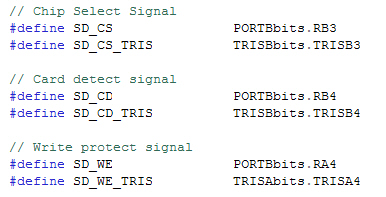
(TRIS registers也要跟著修改)
- Configure main SPI control registers. The defaults are –> SPI控制暫存器定義

Make sure that all the I/O pins used in the SD card interface are configured as digital I/O (and not as analog I/O) –> SPI的腳位要定義成Digital腳位
Modify the linker file to include a 512-byte section of RAM to act as a buffer for file read and write operations. In addition, create a section in the linker called dataBuffer that maps to this RAM. –> 在Link檔建立一個512 byte的RAM區塊 dataBuffer供檔案讀出或寫入操作使用
Modify the linker file to include a 512-byte section of RAM to act as a buffer for read and write of FAT. In addition, create a section in the linker called FATBuffer that maps to this RAM. –> 在Link檔建立一個512 byte的RAM區塊 FATBuffer供FAT讀出或寫入操作使用

- Select the appropriate microcontroller definition file at the beginning of your program. –> 針對所使用的MCU的定義檔案在主程式前要定義好 (如#include …., #pragma ….., #define …..)