
[Android 基礎] 模擬器 Emulator
發表於|更新於|App 與軟體開發Android / App
|瀏覽量:
通常在一開始寫Android程式時,不會直接與Android硬體手機或是平板連結,
Android的開發套件提供了模擬器 (emulator)用來模擬程式實際執行的狀況,
但必須要先設定才能使用,
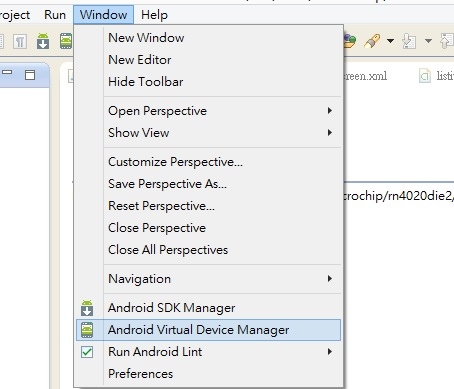
首先,開啟eclipse,到Window–>Android Virtual Device Manager,
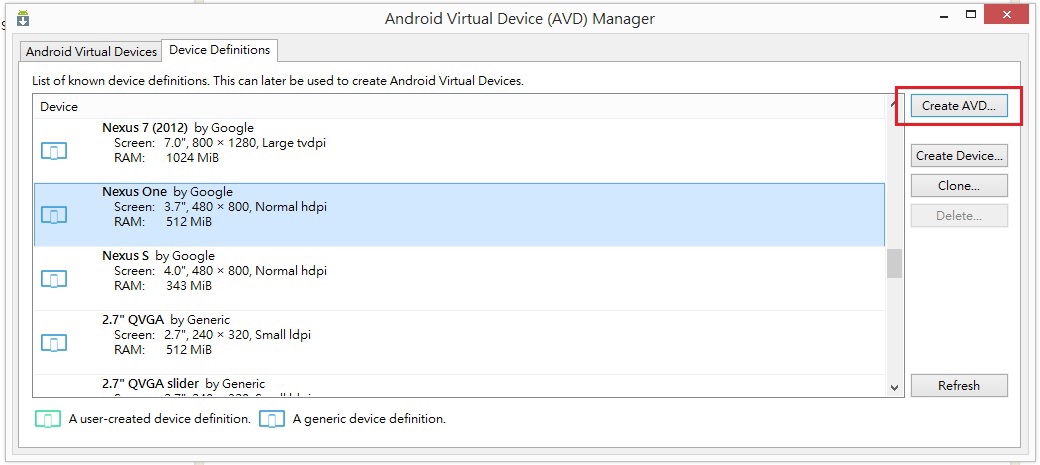
我們從簡單的開始,選擇Device Definition的欄位,接者選擇預設的device,然後按Create AVD,
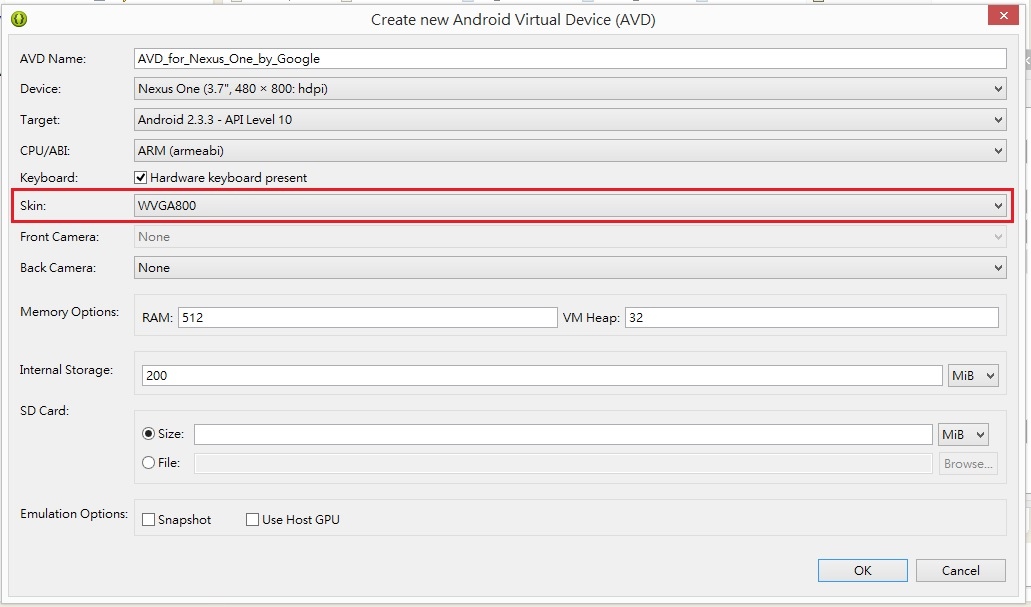
下一步,在Skin中選WVGA800,接著會看到ok的按鈕變成可以使用的狀態,按下ok鈕,
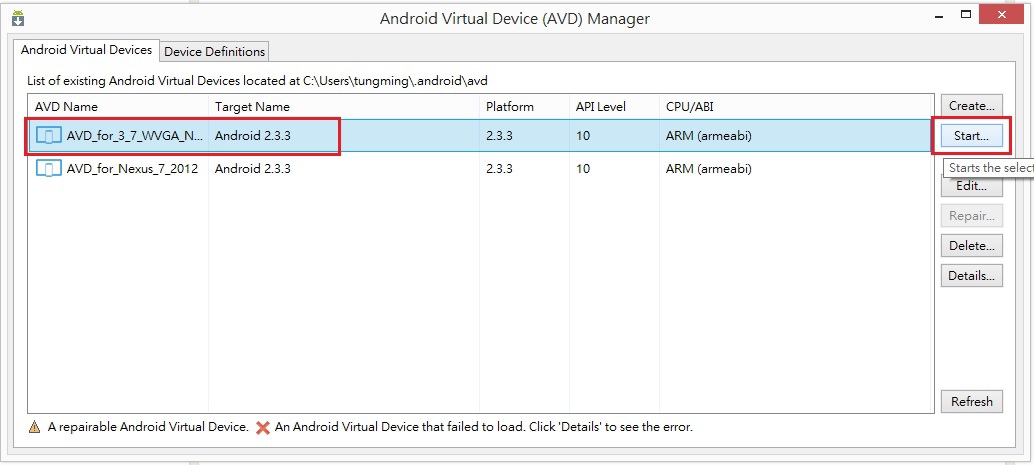
選擇好的模擬器會出現在Android Virtual Device欄位裡,可以設定許多不同的模擬器使用,
選擇剛剛設定的模擬器,按Start,
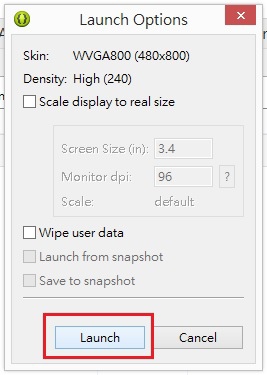
出現Launch Option, 按下Launch鈕,
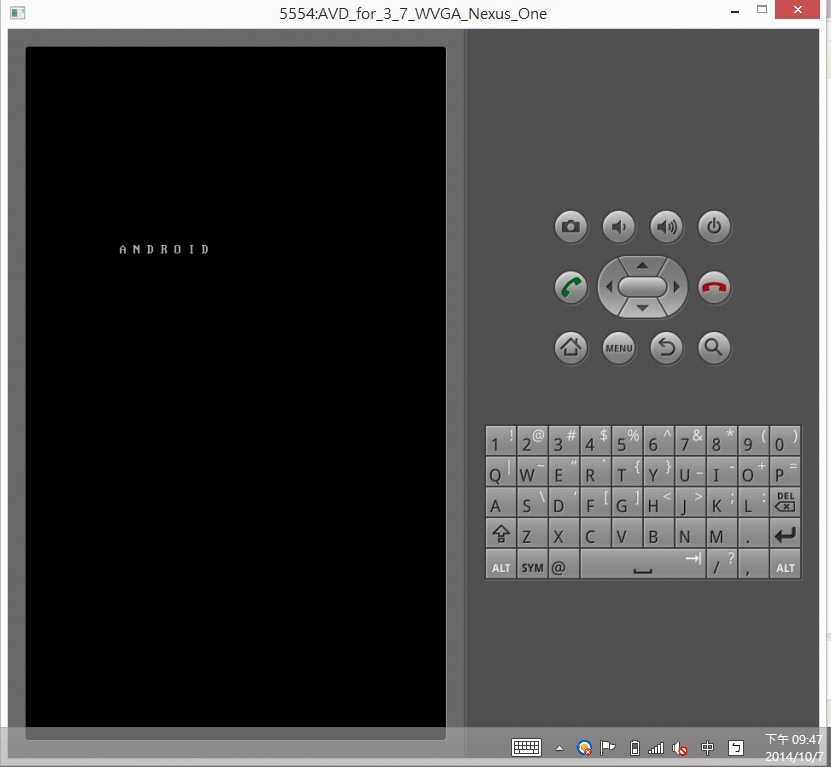
會出現模擬器的起始畫面,接者要等幾分鐘的時間,才會進到模擬手機的開機畫面,
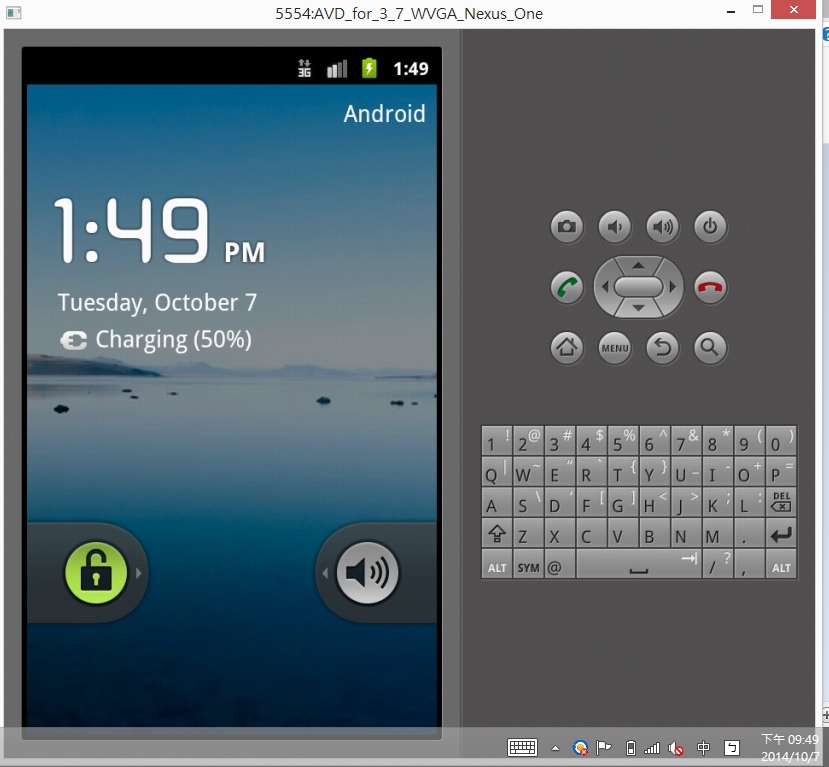
You see, 完成設定了。
文章作者: Jack
版權聲明: 本部落格所有文章除特別聲明外,均採用CC BY-NC-SA 4.0 授權協議。轉載請註明來源 X Workshop|量測自動化 × 嵌入式 × AI 開發實戰!
相關推薦
2014-10-13
[Android 基礎] 按鈕 Button" OnClick"
繼上一篇文章提到如何建立一個最簡單的Hello World 程式後, 我們將增加一個按鈕的功能, 增加幾行程式,按個鈕就會顯示中文翻譯, 首先,請到res–>layout–>activity_main.xml,打開程式視窗畫面, 接者在Form Widgets中的Button按住,然後移到手機程式的畫面上, 接者在按鈕的Properties上,在Id填入CNbutton, 在Text中填入”顯示中文”, 在OnClick中填入CNbutton_OnClick, 接著到src–> MainActivity.java中去修改程式碼, 增加public void CNbutton_OnClick(View v) {}; 在25列處有紅色x,按一下出現提示視窗,選擇”Import View”,即可消除紅色x, 接者增加一行程式: TextView t1 = (TextView) findViewById(R.id.textView1); t1.setText(“哈囉,世界!”); 在27列處有紅色x,按一下出現提示視窗,選擇”Im...
2019-11-16
[LabVIEW]Use mouse and event structure to draw rectangle on waveform graph 使用滑鼠與事件結構在圖形控制向上繪製長方形
This is the example which shows how to use events of the mouse (down, move and up) to draw rectangle on the waveform graph.You can learn how to use event structure, waveform graph property, picture function and bundle/ unboundle vi to implement this example. 這個範例說明如何使用滑鼠的事件,像是按下、移動與釋放去繪製長方形在在圖形控制向上。你可以學習如何使用事件結構、圖形控制的屬性、圖形功能以及bondle/unboundle vi來完成這個範例。 We will share more tutorial videos with people who want to learn LabVIEW. welcome to subscribe this channel.未來會陸續更新影片,讓想學...
2016-07-30
Android程式之動態產生控制項
本篇是說明如何動態產生控制項, 一般的控制項寫法是在.xml檔中直接拉控制項在畫面上, 可以動態產生的控制項的好處是,可以動態產生,也就可以動態刪除, 這一個範例是將TextVIEW, EditText以及Button,用addView()動態置入LinearLayout中, MainActivity.java 12345678910111213141516171819202122232425262728293031323334353637383940414243444546package com.example.demoui;import android.app.Activity;import android.graphics.Color;import android.os.Bundle;import android.view.View;import android.widget.Button;import android.widget.EditText;import android.widget.LinearLayout;import android.widget.TextV...
2014-10-05
[Android 基礎] 將Android App export 成 apk 發佈到ASUS變形平板(TF101)
接者要將上篇文章中產生的HelloWorld專案輸出到實際上的硬體, 我們選擇將專案輸出成APK(application package file), 然後利用ASUS Transformer TF101下載並執行該APK, 第一步,執行Eclipse,File–> Export, 選擇Export Android Application, 選擇要輸出的專案,選HelloWorld,按Next, 第一次使用,選擇Create new keystore,選擇檔案要放置的位置(Location),和設定密碼,按Next, 填好Alias, Password, Confirm, Validity(years),和姓名欄位,按Next, 選擇HelloWorld.apk輸出的位置,按Next, 到檔案輸出的資料夾,keystore和HelloWorld.apk產生了, 使用 Google Driver將HelloWorld.apk分享到變形平板上,按執行,即可看到程式執行的樣子。
2016-07-13
Android控制項之"ListView"
ListView是Android中一種條列式顯示的控制項, 主要使用ListView與ArrayAdapter來顯示, 下列的程式為將要顯示的項目放入Array中, 然後將這一個Array放入ArrayAdpater, 之後再將listview.setAdapter方法,將 ArrayAdpater 放入, Layout Android code: 12345678910111213141516171819202122232425262728293031package com.example.codelistview;import android.app.Activity;import android.os.Bundle;import android.view.Menu;import android.view.View;import android.view.MenuItem;import android.widget.AdapterView;import android.widget.ArrayAdapter;import android.widget.ListVie...
2022-02-28
[第16期] Getting Started with Object-Oriented Programming in LabVIEW /LabVIEW物件導向程式設計入門
This video demonstrates how to use Object-Oriented Programming in LabVIEW. LabVIEW supports class, encapsulation, inheritance and override. 本影片說展示如何在LabVIEW中使用物件導向程式設計。 LabVIEW支援類別、封裝、繼承與覆寫。 References: 1.Introduction to LabVIEW Object Oriented Programming https://youtu.be/kjBedCUuQXE LabVIEW Object-Oriented Programming FAQ https://www.ni.com/zh-tw/support/documentation/supplemental/06/labview-object-oriented-programming-faq.html
公告
本站文章自痞客邦(2006–2024)搬家而來,舊文章的程式碼與圖片如有缺漏,歡迎留言告知。