
[Python] For Loop 迴圈練習
發表於|更新於|Python
|瀏覽量:
[若不想看pixnet廣告,請到此連結: https://labview-tech.blogspot.com/2019/02/python-for-loop.html ]
For Loop練習,使用Google colaboratory。
1. 定義一個List,print List中的值
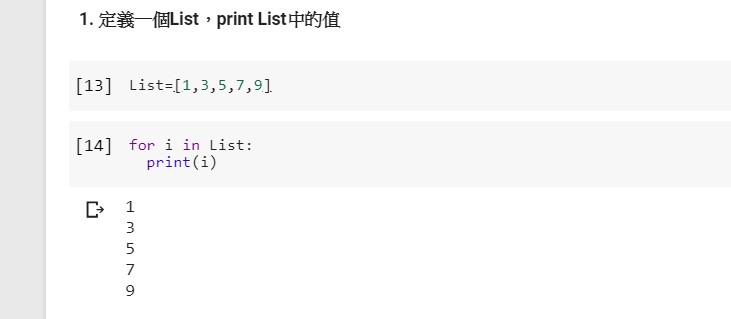
2. 使用range函數來產生for loop的迴圈變數

3. 透過索引(range和len)來執行For Loop

文章作者: Jack
版權聲明: 本部落格所有文章除特別聲明外,均採用CC BY-NC-SA 4.0 授權協議。轉載請註明來源 X Workshop|量測自動化 × 嵌入式 × AI 開發實戰!
相關推薦
2020-04-29
[Python][Voice]Integrate a plot of matplotlib into tkinter GUI/整合matplotlib的繪圖到 tkinter圖形視窗中
This example shows how to integrate a plot or figure on matplotlib into the graphic user interface of tkinter. Import tkinter Import matplotlib Import FigureCanvasTkAgg Import Figure Build a window named “win”. Window format 1: title() Window format 2: geometry() determine size and initial position(x,y) Window format 3: maxsize() set max size of a window Build a figure with figsize = (Width: inch, Length: inch) and dpi = pixel per inch Add the subplot to the figure. Gener...
2022-11-13
[第21期]Use PyQtGraph and PyQt to implement line and scatter plots/使用PyQtGraph與PyQt實現線與散狀圖
This video shows how to use PyQtGraph and PyQt to implement line and scatter plots. The content includes: PyQtGraph Introduction Embedding custom widgets from Qt Designer Use PlotWidget.plot() to add data to plot widget 本視頻說明如何使用PyQtGraph與PyQt實現線與散狀圖。 內容包含: PyQtGraph簡介 在Qt Designer嵌入客製化部件模組 使用PlotWidget.plot()新增資料到繪圖部件中
2022-11-13
[第22期]Use PyQtGraph and nidaqmx to implement real time plots/使用PyQtGraph與nidaqmx實現時實的繪圖
This video shows how to use PyQtGraph and nidaqmx to implement real time plots. The content includes: Install NI-DAQmx and python nidaqmx Use Qt Designer to design GUI Real-time display DAQ data 本视频说明如何使用PyQtGraph与nidaqmx实现时实的绘图。 内容包含: 安装NI-DAQmx与python nidaqmx 使用Qt Designer设计图形介面 实时显示DAQ资料
2022-10-15
[第19期]Write a PyQt calculator program by using MVC architecture/使用MVC架構寫一個PyQt計算機程式python
This video demonstrate how to write a PyQt calculator program by using MVC architecture. The content includes: MVC Architecture Introduction Place codes with different purposes into Model.py, View.py and Controller.py PS: calculator.py please refer to video No. 18. 本視頻說明如何使用MVC架構寫一個PyQt計算機程式, 內容包含: MVC架構簡介 將不同意義的程式碼分別寫在Model.py, View.py以及Controller.py中。 註: calculator.py請參考第18期視頻
2019-05-25
Windows下安裝Python、virtualenv與 Django
想在Windows下開發Django應用程式,需要安裝: Python virtualenv Django 1. Python下載與安裝:選 Python 3.7.3 下載 安裝時請注意以下幾點: 請注意安裝路徑, 他預設是在”使用者”目錄下面, 最好換到非中文目錄底下。 安裝時選 customize install, 這樣才可以自選安裝路徑。 安裝 pip如果是安裝 python 3.5 以上的, 都會預設安裝 pip, 所以只要更新 pip 即可, 關於 pip 與 pip3 的差異pip 和 pip3 都在 Python36\Scripts\ 目錄下, 如果同時裝有python2 和 python3, pip 默認給 python2 用, pip3 指定給 python3 用, 如果只裝有 python3,則pip和pip3是等價的, 安裝了python3之後,就會有pip3。 選 Add python 3.7 to path 安裝完成 2. Django安裝在安装 Django 前,系统需要已经安装了Python的开发环境。 Django 下载地址:htt...
2022-11-21
[第23期]Use pytube and PySide to download YouTube audio(mp3)/使用pytube與PySide下載YouTube聲音檔(mp3)
This vedio shows how to use pytube and PySide to download YouTube audio (mp3). The content includes: PySide Introduction Filter Audio Stream Download and rename Youtube mp3 file 本視頻說明如何使用pytube與PyQt下載YouTube影片。 內容包含: PySide簡介 篩選聲音資料流 下載和重新命名YouTube MP3檔 Pyside template 1234567891011import sysfrom PySide6 import QtWidgetsfrom PySide6.QtCore import QFile, QIODevicefrom PySide6.QtUiTools import QUiLoaderclass MainWindow(QtWidgets.QMainWindow):def __init__(self, ui_file_name, *args, ...
公告
本站文章自痞客邦(2006–2024)搬家而來,舊文章的程式碼與圖片如有缺漏,歡迎留言告知。